Quick note before I start. I’ve got mild dyslexia, so I use AI tooling to help with my writing, but the thoughts are all mine.
A while ago I built a tool called WebMCP Resilience.
The idea is simple enough. Websites are starting to offer tools that AI assistants can call directly, through something called WebMCP. So a shop’s assistant can add things to your basket, book you a class or place an order, while you’re clicking around the same page.
Each of those actions can work perfectly on its own, and still go wrong when they happen at the same time.
You click Book on the last seat. The assistant books it too. Now two people have one seat.
WebMCP Resilience is meant to find that sort of thing before your customers do. It runs a person and an assistant against the page at the same moment, adds delays, repeats calls, cancels them halfway through, and checks a rule you give it, such as “never more bookings than seats”.
But I built it. Of course I think it’s useful.
So I thought I’d better check.
My first attempt didn’t work
My first plan was a proper experiment. Give a coding agent a reported bug, with and without the tool, and see whether the tool helped it fix the bug.
I built six small apps, each with a timing bug hidden in it. A basket that adds things twice. The last seat sold twice. A form that loses your changes. A listing that saves half of what you asked. A payment taken with no order. A quantity that goes stale.
Then I gave them to the agent without the tool.
It fixed five of the six.
There’s not much point measuring whether a tool helps when the agent doesn’t need any help. So I parked it.
A simpler question
What I actually wanted to know was much simpler.
Does the tool catch bugs that an ordinary check misses? And does it keep quiet when the code is right?
So I took the six apps and made 31 versions of them:
- 6 originals, each with its bug;
- 6 correct fixes;
- 12 plausible but wrong fixes, the sort of thing you’d write on a Friday afternoon;
- 7 real fixes written by coding agents, six by a hosted model and one by a model running on my own machine.
For each version I worked out whether it was really buggy, using a separate set of hidden tests that don’t use my tool at all.
Then I ran two checks against every version:
- an ordinary check: one person or one assistant, at normal speed. This is what most of us test, and what coding agents test too;
- WebMCP Resilience, with two or three scenarios per app, each run three times, because timing bugs can be flaky.
What happened
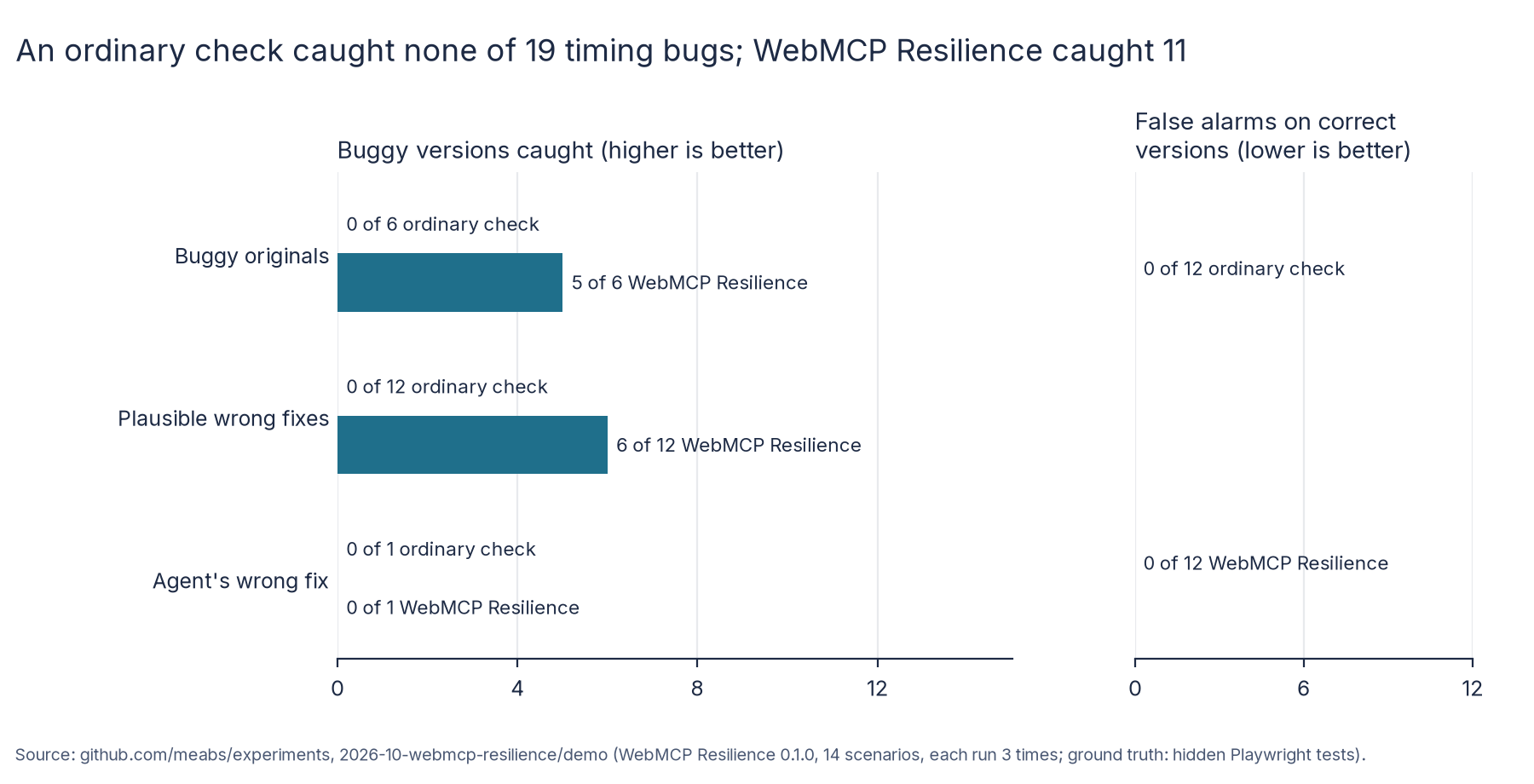
The ordinary check caught none of the 19 buggy versions (0 of 19).
Not one. Every buggy version worked fine when only one thing happened at a time. That’s the whole problem with timing bugs.
WebMCP Resilience caught 11 of the 19. It raised no false alarms on the 12 versions that were actually correct. And it gave the same answer in all three runs every time, which I was quite relieved about.
When it caught something, it didn’t just say “failed”. It saved the rule that broke, what it saw (two bookings, one seat), a screenshot, a trace and a cut-down scenario I could replay.
What it missed
I’m more interested in the eight it missed, to be honest.
- Four needed the server to be slow, or to answer out of order. The tool can delay the assistant’s calls, but it can’t slow down the server. Some bugs only show up when one reply overtakes another.
- One needed another customer booking through the gym’s own app, not through the page. The tool only drives the page.
- Three were cases I simply didn’t write a scenario for, such as two free seats rather than one, or a customer retyping their email address exactly as it was.
That last group includes the one real agent fix that was wrong. The agent’s fix looked fine. It passed the ordinary check. My tool didn’t catch it either, because I never thought to test that particular sequence.
That’s a fair lesson. The tool checks the situations you describe. It doesn’t dream up new ones for you.
Eating my own dog food
Using my own tool properly for a day turned up some rough edges.
- It didn’t wait for the page’s tools to load. These apps register their tools a fraction of a second after the page opens, and every run failed until I added a small wait. That one’s going straight on my to-do list.
- It lost track of the tools after a page reload, so I couldn’t test “the customer pressed refresh and the assistant retried”.
- My own first scenario was wrong. I assumed the click would always land before the assistant’s call. It didn’t, and the tool flagged perfectly good code. Once I fixed the rule, that bug went undetected.
Slightly embarrassing, but better found by me than by someone else. 😂
What I’m fixing
I’m working on these at the moment:
rundoesn’t wait for tools that register after the page loads, so every run failed until I added a wait.- The tools are lost after a page reload.
- Without
--ci, it hangs on a machine with no display. - There’s no way to make the server slow, which caused 4 of the 8 misses.
The last one matters most. It’s behind half of the misses.
So, is it useful?
I think so, with some honesty about what “useful” means here.
I wrote the scenarios knowing where the bugs were, so this shows what the tool can catch with a sensible scenario. It doesn’t show what you’d find going in blind.
But the headline is hard to argue with. An ordinary test caught none of these bugs. A dozen short scenarios caught more than half, without a single false alarm on correct code.
If you’re adding AI assistant tools to a site where people also click buttons, it’s worth testing what happens when they both act at once. Your normal tests almost certainly don’t.
And if your bug depends on a slow server or another customer, you’ll need more than my tool. For now, anyway.
The apps, every scenario and the full results are on GitHub, if you’d like to try it yourself.