Article · 29 Oct 2026
I Fixed My Testing Tool. Did It Find More Bugs?
Quick note before I start. I’ve got mild dyslexia, so I use AI tooling to help with my writing, but the thoughts are all mine.
In my last article, I tested my own tool, WebMCP Resilience.
Quick recap if you missed it. Websites are starting to offer tools that AI assistants can call directly, through WebMCP. My tool checks what happens when a person and an assistant use the same page at the same moment. You click Book on the last seat, the assistant books it too, and now two people have one seat.
I pointed it at 31 versions of six small apps. 19 of them had a timing bug. An ordinary check caught none of them. My tool caught 11, with no false alarms.
I also found four problems with the tool and said I was fixing them. So I did. Then I ran exactly the same test again.
What I changed
- It now waits for the page’s tools to load. These apps register their tools a fraction of a second after the page opens. Before, every run failed unless I added a wait myself.
- It keeps working after a page reload. Before, it lost track of the tools as soon as the page refreshed, so I couldn’t test “the customer pressed refresh and the assistant tried again”.
- It runs without a screen by default. Before, it hung on a machine with no display unless you remembered a flag.
- It can slow the server down. This was the big one. Four of the bugs it missed only show up when the server is slow, or when its replies come back in the wrong order. The tool can now hold a server reply for a while, and give each reply its own delay, so a later reply can overtake an earlier one.
My fix broke something
The first rerun was a bit of a surprise.
The fixed tool caught a new bug, the one that only shows up after a reload. But it also stopped catching one it had caught before.
The fix made the tool’s setup slightly slower, about a sixth of a second. That time was being counted as part of the test. So an action meant to happen at the start actually happened a sixth of a second late, while later actions stayed on time. The gap between them shrank, and a cancel that was supposed to land while an order was being created landed during the payment instead.
The tool hadn’t got worse at spotting the bug. It just wasn’t doing quite what the scenario asked.
That got its own fix. It’s a good reminder of why you rerun the whole test after a change, not just the bit you were fixing. 😅
The rerun
I ran the same 31 versions through three times, with each check repeated three times because timing bugs can be flaky:
- The original tool, with my workarounds;
- The fixed tool, with no workarounds at all;
- The fixed tool, with a slow and out-of-order server.
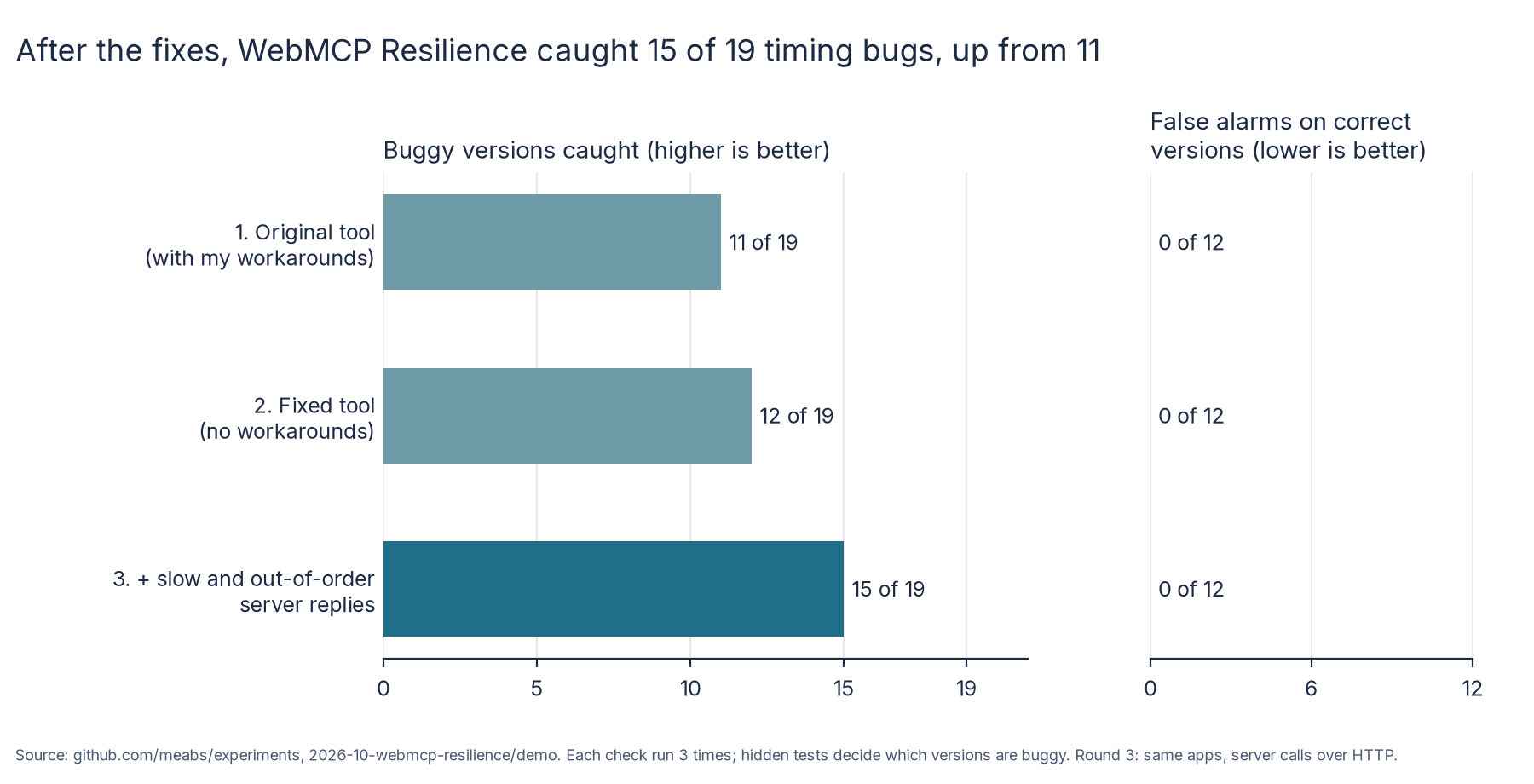
It caught 15 of the 19 buggy versions, up from 11. There were still no false alarms on the 12 versions that were actually correct. Every result was the same in all three repeats.
Here’s what each change brought:
- Waiting for the tools and running without a screen didn’t catch anything new on their own, but I no longer need any workarounds to use the tool.
- Surviving a reload caught 1 more: a fix that worked until the customer refreshed the page.
- A slow server caught 1 more: a fix that only went wrong when the shop was slow to respond.
- Replies in the wrong order caught 2 more: the stale-quantity bug and one of its wrong fixes. A slow reply arrived last and quietly overwrote the newer quantity.
So all four of the bugs I’d put down to a slow server are now caught.
One thing I had to change in the apps
There’s a catch I should be honest about.
The tool slows down real network requests. My six little apps faked their server inside the page, so there was nothing on the network for it to slow down.
For the third round, I changed the apps so each server call also goes over the network, the way a real website’s would. Nothing else changed. I checked that the hidden tests still found exactly the same bugs in exactly the same versions.
I also added ten new scenarios for slow and out-of-order servers. Each one had to pass on correct code three times before I used it. An eleventh didn’t, because I’d assumed something about the app that wasn’t true, so I left it out.
And as before, I wrote the scenarios knowing where the bugs were.
What it still misses
Four bugs still get through:
- Three are situations I simply haven’t written a scenario for, like two free seats instead of one, or a customer retyping their email address exactly as it was. One of those is the wrong fix a coding agent wrote.
- One needs another customer booking at the same time through the gym’s own app, not through the page. The tool still only drives the page.
The first three are on me. The last one is a gap in the tool.
So, was it worth it?
I think so.
Fixing the rough edges mostly made the tool easier to trust and use. Letting it slow down the server is what actually caught more bugs.
The bit I’m most pleased about is the out-of-order replies. A slow reply overwriting a newer one is exactly the sort of bug that works fine every time you test it by hand, and then goes wrong for a real customer on a bad connection.
And the regression is a fair warning. My own fix made the tool miss a bug it used to catch, and I’d only have noticed because I reran everything.
The tool still only checks the situations you describe. But it now handles a lot more of the situations worth describing.
The apps, every scenario and all three rounds of results are on GitHub, if you’d like to try it yourself.